
Meta Advantage Plus is Meta's suite of AI tools that runs audience, placement, budget and creative decisions inside your Facebook and Instagram campaigns. It can perform very well, and Meta reports real efficiency gains. The AI itself isn't the risk. The risk is letting Advantage+ run unreviewed, with nobody checking what it changed before customers see it.
The gains are significant: Meta says advertisers see "20% improved CPA when using Advantage+ sales campaigns." This guide is for business owners running AI Facebook ads who are being steered toward Advantage+ and want to know what changes when Meta's AI takes the wheel. It is part of our series on unsupervised AI in digital marketing.
Contents
- What is Meta Advantage Plus?
- What Meta AI ads do well
- What can go wrong when nobody reviews Advantage+
- Meta generative AI ads creative best practices
- Can you turn off Advantage+ features?
- How Ascend Group Media reviews Meta AI ads
- The bottom line on Meta Advantage Plus
- Frequently Asked Questions
- Resources
What is Meta Advantage Plus?
Meta's own definition, from its Business Help Center: "Meta Advantage+ is a suite of products that helps advertisers maximise performance by using AI to optimise campaigns in real time and match ads to the people most likely to take action." Its end-to-end campaigns go further, promising to "Increase efficiency by automatically applying AI across your campaign's audience, placement and budget," according to Meta for Business.
In practice, an Advantage Plus Meta campaign hands four decisions to the system: who sees the ad (Advantage+ audience), where it runs (Advantage+ placements), how the budget is split, and, through Advantage+ creative, parts of the ad itself. Those are the same four decisions a media buyer used to make by hand in Ads Manager. Handing them over can be a smart move. It also means someone should check the choices the system makes.
Meta Advantage+ shopping campaigns are now Advantage+ sales campaigns
If you searched for Meta Advantage+ shopping campaigns, you're in the right place. Meta's Marketing API documentation explains that "Advantage+ sales and app campaigns are the updated, streamlined versions of" Advantage+ shopping and app campaigns. The Meta for Business page carries the footnote "*Formerly known as Advantage+ shopping campaigns."
The same documentation adds: "No action is required to opt in to Advantage+ placement, as it is the default setting in the API." Put simply, Meta decides where your ads appear unless someone deliberately changes that setting.
What Meta AI ads do well
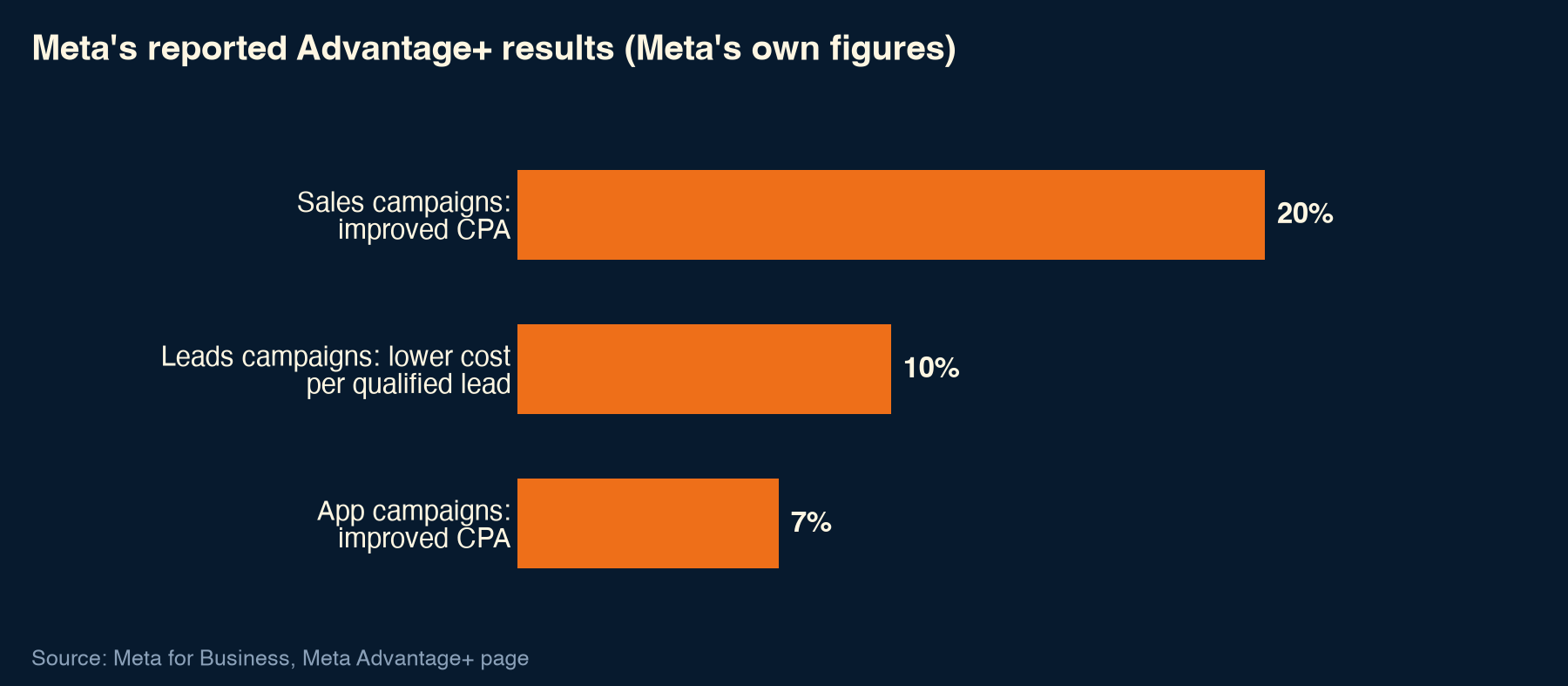
Meta AI ads have a real upside. On its Meta Advantage+ page, Meta reports:
- "20% improved CPA when using Advantage+ sales campaigns."
- "10% lower cost per qualified lead when using Advantage+ leads campaigns."
- "7% improved CPA when using Advantage+ app campaigns."
These are Meta's own claims, and Meta does not publish the study detail on that page. In a developer blog post from October 31, 2024, Meta added that existing users reported "a 17% decrease in cost per action and a 32% increase in return on ad spend."
One older figure comes with more method attached. In an April 14, 2023 developer post, Karen Chui of Meta reported that ads opted into standard enhancements delivered "a 4% reduction in cost-per-result." That was based on one month of experiments across 154,000 ad accounts, from May 2 to 30, 2022.
The mechanism is easy to follow. Meta's AI can test far more combinations of audience, placement and creative than any person could build by hand. In our experience, that testing speed is the most valuable thing Facebook ads AI offers, and it's worth having.
What can go wrong when nobody reviews Advantage+
The automation that finds efficient combinations also makes changes nobody approved line by line. That doesn't mean the system is broken. It means the output needs a reviewer, just as a talented new hire's first campaigns would.
Meta Advantage+ creative AI features for ads can change your ad
Meta's About Advantage+ creative page is direct about this: "Some enhancements may be turned on by default, but you can turn them off at any time." It continues: "The media and text that you upload may be adjusted to help improve ad performance while maintaining the core message of your campaign."
Meta lists 31 enhancements in total. The generative AI features include "Image generation (AI)", "Background generation (AI)", "Image touch-ups (AI)", "Text generation (AI)", "Add music (AI)", "Translations (AI)" and "Video touch-ups (AI)". Meta also notes: "We launched supplemental terms for our generative AI features on 6 May 2024."
In business terms, a background might be swapped, a headline rewritten or a product retouched. Most of the time that is fine. When it isn't, the ad customers see no longer matches the product you sell or the claims you have approved.
AI generated Facebook and Instagram ads: the REI example
In June 2026, Carscoops, reporting Fast Company, described an REI Instagram ad that showed a Van Rysel EDR AF bike with two sets of handlebars. REI's statement read: "Meta auto-enrolled us in an AI personalization tool that produced an inaccurate and inappropriate alteration." It continued: "We have taken steps to unenroll from the tool. This does not align with our values or how we manage our brand."
Meta has not confirmed REI's account of the auto-enrollment. The practical lesson for any brand is a narrow one: a person previewing AI-altered creative before launch is the check that catches this kind of output.
Budget can drift toward existing customers
According to Meta's Marketing API documentation, the existing-customer budget percentage field isn't available for new Advantage+ campaigns. Meta's suggested approach is two ad sets: one for existing customers with a spending limit, and one that excludes them. Meta also states, "The complete range of ad tools will remain available to meet businesses' needs."
Here's why this matters. An AI optimizing for purchases looks for the people most likely to buy, and your existing customers are often those people. Without a limit or an exclusion, some of your budget can go to people who would have bought anyway. That makes the platform's numbers look strong without adding much new revenue.
Placements and audiences run on defaults
Advantage+ placement is on by default, according to Meta's API documentation, and Advantage+ audience applies the same AI to who sees your ads. Treat each default as a starting point that someone should confirm, not as a decision already made. For example, an image with fine print designed for one placement may not read well in all of them.
| Setting | What Meta says | The review step |
|---|---|---|
| Advantage+ placement | The default setting in the API | Confirm the placements suit the creative |
| Creative enhancements | "Some enhancements may be turned on by default" | Review each toggle before launch |
| Generative AI features (image, background, text) | Uploaded media and text "may be adjusted" | Preview every output for accuracy and brand fit |
| Existing-customer budget | Cap field not available for new Advantage+ campaigns | Use the two ad set structure if it matters |
Settings described in Meta's Business Help Center and Marketing API documentation.
Meta generative AI ads creative best practices
The checks below keep Advantage+ working for you. None of them slows the AI down. They make sure the output is right before it goes live.
- Review every creative enhancement toggle before launch. Meta says "you can turn them off at any time," so switch off any enhancement you haven't approved.
- Preview generated images, backgrounds and text. Check each one for product accuracy, brand fit and any claims.
- Keep a human sign-off for any AI-altered product image. If the product in the ad doesn't match the product in the box, it doesn't run.
- Set up the two ad set structure if spend on existing customers matters to you.
- Confirm placements suit the creative, since Advantage+ placement is the default.
- Recheck settings after launch and after every campaign edit. Defaults and enhancements are worth a second look whenever something changes.
- Judge results by your own business numbers, such as revenue, margin and qualified leads, not only by the platform's reported gains. Our guide on whether Facebook ads are worth it shows how to frame that.
Can you turn off Advantage+ features?
Yes, for creative enhancements. Meta's Advantage+ creative help page says some enhancements "may be turned on by default, but you can turn them off at any time." Meta builds that control in, so reviewing enhancements is a normal part of running the account, not a workaround.
For placements and existing-customer spend, Meta's documentation points to the controls described above: confirm the placement setting, and use the two ad set structure to limit or exclude existing customers.
Turning a feature off isn't the same as avoiding AI. It means choosing deliberately. Keep the enhancements you have previewed and approved, and switch off anything you haven't checked.
How Ascend Group Media reviews Meta AI ads
At Ascend Group Media, we use Advantage+ where it helps, and we like what it does for testing speed. Before anything runs, an experienced specialist reviews the audience, placements, budget split and every AI-generated creative. What we check first is the creative enhancement list, because that is where the ad itself can change. Next comes the existing-customer structure, because that decides where the budget goes.
That review is built into our Meta ads management, so you keep the efficiency of Meta's AI with a person accountable for the output. Google's automation needs the same oversight, which we cover in our guides to Google Performance Max and Google Ads automation.
The bottom line on Meta Advantage Plus
Meta Advantage Plus is a capable system, and Meta's own figures show why so many advertisers use it. The opportunity comes from pairing it with a person who reviews what it changed: the creative, the placements and the share of budget going to existing customers. When those checks are in place, your ads stay accurate and your budget stays on target.
If you'd like a second pair of eyes on your Advantage+ settings and creative enhancements, get in touch with Ascend Group Media and we'll walk through them with you.
Frequently Asked Questions
Are Advantage+ shopping campaigns the same as Advantage+ sales campaigns?
Yes. Meta's Marketing API documentation describes Advantage+ sales and app campaigns as "the updated, streamlined versions of" Advantage+ shopping and app campaigns. The Meta for Business page includes the footnote "*Formerly known as Advantage+ shopping campaigns." If you're looking for advice on Advantage+ shopping campaigns, everything here applies to the sales campaigns that replaced them.
Does Meta use AI to change my ads?
It can. Meta's Advantage+ creative page says "The media and text that you upload may be adjusted to help improve ad performance while maintaining the core message of your campaign," and notes that some enhancements may be on by default. The generative AI features include image generation, background generation, text generation and translations. Preview the output before launch so you know exactly what customers will see.
Can you turn off Advantage+ creative enhancements?
Yes. Meta states that some enhancements "may be turned on by default, but you can turn them off at any time." We recommend reviewing each enhancement before launch, keeping the ones you've previewed and approved, and switching off anything you haven't checked. It's a normal part of managing the account.
Are AI-generated Facebook ads worth using?
Yes, with review. Meta reports efficiency gains from Advantage+, and AI that tests creative combinations at scale is useful. The value depends on a person checking that generated images and text are accurate and on brand, and on judging results by your own revenue and leads. Our guide on whether Facebook ads are worth it covers how to measure that.
Does Advantage+ spend budget on existing customers?
It can. Meta's documentation says the existing-customer budget percentage field isn't available for new Advantage+ campaigns. Meta's suggested approach is two ad sets: one for existing customers with a spending limit, and one that excludes them. Without that structure, some spend can reach people who would have bought anyway.
How much does Meta Advantage Plus cost?
Advantage+ is a way of running your Meta campaigns, and your spend is set by the budget you choose. What matters is what that budget returns in revenue or qualified leads. For a fuller picture of spend levels and what drives them, see our guide to what Facebook ads cost.
Is Meta Advantage Plus a good fit for small businesses?
It can be. Advantage+ hands audience, placement and budget decisions to Meta's AI, which saves time for a business without a dedicated media buyer. The trade-off is that someone still needs to review creative enhancements, placements and existing-customer spend. If you can set aside time for those checks, or have a partner do them, Advantage+ is worth testing against your own business numbers.
Resources
- Meta Business Help Center: About Meta Advantage+
- Meta for Business: Meta Advantage+
- Meta for Developers: Marketing API, Advantage+ campaigns
- Meta for Developers blog: Advantage+ shopping campaigns, automated ecommerce advertising (October 31, 2024)
- Meta Business Help Center: About Advantage+ creative
- Meta for Developers blog: Advantage+ creative standard enhancement API launch, Karen Chui (April 14, 2023)
- Carscoops, reporting Fast Company: REI and Meta AI ad (June 26, 2026)
From the blog.



Let’s put this to work for you.
Tell us where you want to go. We’ll map the fastest path to revenue, no obligation.