
An accessibility overlay is a widget added to your website with a single line of code that applies automated changes to the page, and it does not make a site compliant on its own. Compliance comes from fixing the site's code and content, then having people test it with the tools your customers actually use.
Regulators have said so too. In January 2025 the Federal Trade Commission (FTC) announced an order requiring accessiBe to pay $1 million over allegations that it falsely claimed its AI-powered tool could make any website compliant with WCAG, the Web Content Accessibility Guidelines that serve as the international standard for accessible websites.
Automated tools, including AI-assisted ones, are genuinely good at finding accessibility issues. Things go wrong when an overlay is left to fix a site on autopilot, the same pattern we cover in our guide to unsupervised AI. Below is what the evidence shows, and what works instead.
Contents
- What is an accessibility overlay?
- Why accessibility matters to your business
- Why a one-line AI fix won't make your site compliant
- Accessibility overlay lawsuits: do widgets reduce legal risk?
- Accessibility overlay alternatives: fixes that live in the build
- Supervised accessibility: a checklist for your website
- Build it in, then keep testing
- Frequently Asked Questions
- Resources
What is an accessibility overlay?
An accessibility overlay is a third-party widget or toolbar, often marketed as AI-powered, that sits on top of your website once you add a script. Visitors usually see a small icon that opens options such as text resizing and contrast toggles. Behind the scenes, the script also tries to make automated changes to the page. Accessibility overlay companies typically sell it on a subscription, and the pitch is almost always speed: one line of code, live in minutes.
The automation inside these tools is useful. Automated testing is good at spotting issues at scale, such as missing alt text (the written description of an image that software can read aloud) and low color contrast (text that doesn't stand out enough from its background to read comfortably). Many teams run automated scans as the first step of a proper accessibility audit.
What matters is what happens after the scan. When a scan finds issues, a person gets a list of things to fix. An overlay tries to patch those issues in each visitor's browser every time the page loads, and the site underneath stays the same.
Why accessibility matters to your business
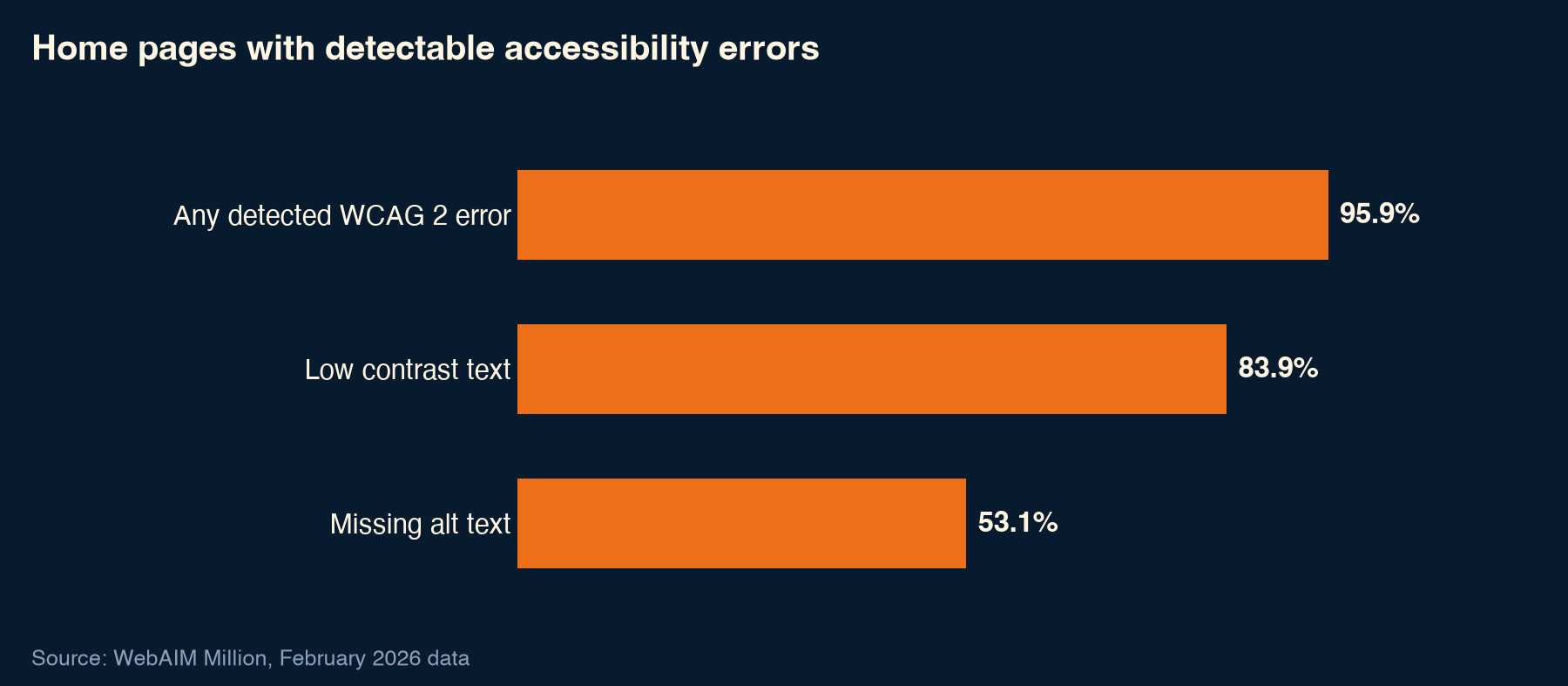
Most websites have room to improve, so accessibility is a growth opportunity as well as a responsibility. In WebAIM's The WebAIM Million analysis (February 2026 data), home pages had "an average of 56.1 errors per page." Low contrast text appeared on 83.9% of home pages and missing alt text on 53.1%. WebAIM also reports that 95.9% of home pages had WCAG 2 errors its testing could detect.
 In business terms, every one of those errors is a possible exit. If customers can't read your pricing, move through your menu without a mouse or submit your enquiry form, they leave, and you lose the lead. The fixes help everyone else as well. Clear contrast, descriptive labels and logical headings make any page easier to scan.
The standard is also still changing. According to the W3C, WCAG 2.2 became a W3C Recommendation on "5 October 2023" and added "9 requirements (called success criteria)" compared with WCAG 2.1. The current edition is dated "W3C Recommendation 12 December 2024."
Why a one-line AI fix won't make your site compliant
The tool itself is fine. The trouble comes from relying on it unattended. A regulator, a large group of accessibility professionals and a practitioner survey all reached the same conclusion about overlays left to do the job alone.
What the FTC found
The FTC's January 2025 proposed order against accessiBe became final on April 22, 2025, when, according to the FTC's announcement, "the Commission voted 3-0 to approve the final consent order." The FTC said "accessWidget did not make all user websites WCAG-compliant" and that "these claims were false, misleading, or unsubstantiated."
Samuel Levine, Director of the FTC's Bureau of Consumer Protection, set out the principle in the January 2025 announcement:
"Companies looking for help making their websites WCAG compliant must be able to trust that products do what they are advertised to do. Overstating a product's AI or other capabilities without adequate evidence is deceptive, and the FTC will act to stop it."
What accessibility professionals say
The Overlay Fact Sheet, signed by more than 1,000 people, states: "No overlay product on the market can cause a website to become fully compliant with any existing accessibility standard." It adds: "Overlay widgets are unnecessary and are poorly placed in the technology stack." Put simply, the overlay sits on top of the site, while the issues are inside it.
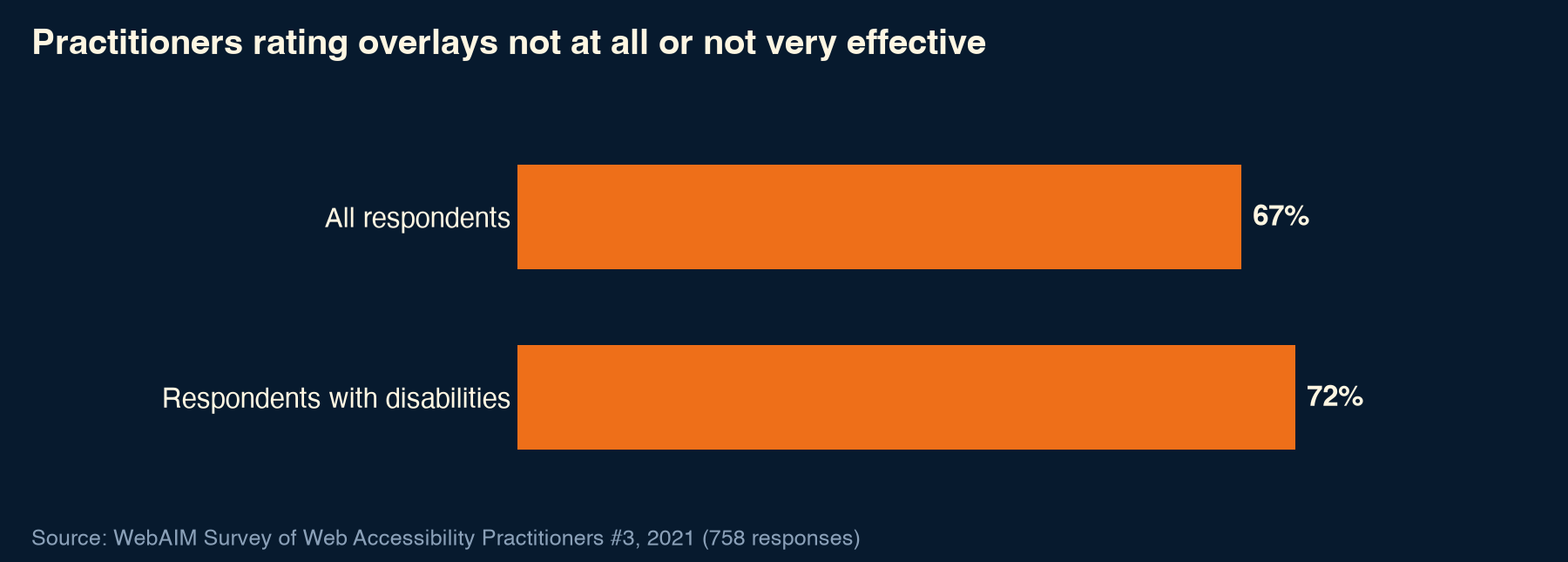
Survey data agrees. In WebAIM's 2021 practitioner survey, Survey of Web Accessibility Practitioners #3, "A strong majority (67%) of respondents rate web accessibility overlays, plugins, or widgets as not at all or not very effective." The survey had 758 valid responses.
Can an accessibility overlay pass a WCAG audit?
Not on its own. The Overlay Fact Sheet puts it directly: "full compliance cannot be achieved with an overlay." The reason is where the issues are. Many of them are built into the page's structure, content and forms. Examples include headings in the wrong order, images that need a person to explain what they show, form fields without labels and error messages shown only in red. A script on top of the page has to guess at those fixes. An audit checks what a visitor actually experiences, so a wrong guess still counts as an issue.
Are accessibility overlays accessible?
Many people ask this, and the answer has some nuance. Assistive technology is the software and hardware people with disabilities use to get around the web. A screen reader is one example: software that reads the page aloud for people who are blind or have low vision. UsableNet, a company that sells accessibility remediation services, notes in its 2025 year-end lawsuit report that "Widgets typically do not resolve underlying code-level accessibility issues and may interfere with assistive technologies such as screen readers."
Overlays are sometimes described as necessary for people with disabilities. Yet the group they are meant to serve rated them lowest. In WebAIM's 2021 practitioner survey, "Respondents with disabilities were even less favorable with 72% rating them not at all or not very effective, and only 2.4% rating them as very effective."
Accessibility overlay lawsuits: do widgets reduce legal risk?
Many owners install a widget because they worry about ADA claims. The ADA is the Americans with Disabilities Act, the US disability rights law. The most detailed recent data comes from UsableNet's 2025 Year-End Digital Accessibility Lawsuit Report. UsableNet sells accessibility remediation services, so keep that in mind when reading it. Its figures are drawn from court filings: "UsableNet reviewed more than 5,000 ADA-related digital accessibility lawsuits filed in federal and state courts."
On widgets, the report is clear: "Accessibility widgets did not slow litigation in 2025. An increasing number of lawsuits were filed against companies already using these tools." UsableNet's 2025 year-end report charts more than 1,400 lawsuits against sites already using widgets.
| The promise | What the evidence shows | Source |
|---|---|---|
| Instant WCAG compliance | "accessWidget did not make all user websites WCAG-compliant" | FTC, 2025 |
| Full compliance with one line of code | "No overlay product on the market can cause a website to become fully compliant with any existing accessibility standard" | Overlay Fact Sheet |
| Better for users with disabilities | 72% of respondents with disabilities rated overlays not at all or not very effective | WebAIM practitioner survey, 2021 |
| Protection from lawsuits | More than 1,400 lawsuits in 2025 against sites already using widgets | UsableNet 2025 year-end report |
Sources: FTC, Overlay Fact Sheet, WebAIM (2021), UsableNet (2025).
The report's conclusion: "reducing legal risk requires substantive remediation, not add-on tools." Remediation means fixing the underlying issues in the site itself. This article isn't legal advice. Please speak to your own lawyer about your situation.
Accessibility overlay alternatives: fixes that live in the build
The best accessibility overlay alternative is work a good website build should include anyway. Supervised accessibility looks like this:
- Clean page structure: headings in a logical order so people and software can follow the page.
- Meaningful alt text for every image that carries information.
- Color contrast that meets WCAG.
- Full keyboard navigation, so every menu, button and form works without a mouse.
- Accessible forms: labeled fields and error messages that explain how to fix the problem.
- Captions for video.
- Testing with real screen readers on your key journeys.
- Automated scans, including AI-assisted tools, reviewed by a person.
- Fixes added to the design system, so new pages stay accessible.
At Ascend Group Media, we use automated and AI-assisted checks to find issues faster, and experienced people fix and verify them in the build. That approach runs through all our web development work. The work also pays off in search: clean structure and alt text help search engines understand a page, which is a core part of technical SEO. The same principle applies to AI-generated websites and vibe-coded websites: automation speeds up the work, and people check what ships.
Supervised accessibility: a checklist for your website
Use this list to review your current site, or hand it to whoever manages it:
- Run an automated scan
- Have a person review the results
- Test every page with a keyboard only
- Test key journeys with a screen reader
- Check color contrast
- Write alt text for meaningful images
- Label every form field and error message
- Add captions to video
- Fix issues in the site code and content, not in a layer on top
- Re-test after every redesign or new page template
Older sites sometimes have structural issues deep enough that fixing them page by page costs more than rebuilding. If several items on this list fail across your templates, read our guide to the signs your website needs a redesign.
Build it in, then keep testing
An accessibility overlay can't do the job alone. Automation is still a strong ally when a person acts on what it finds. If you build accessibility into the site and keep testing it, your customers get a site they can use, you have a better footing for compliance, and every visitor gets a clearer page. If you'd like your site's accessibility reviewed as part of a build or rebuild, our web development team is happy to help. Get in touch to start the conversation.
Frequently Asked Questions
Can an accessibility overlay pass a WCAG audit?
Not on its own. The Overlay Fact Sheet states that "full compliance cannot be achieved with an overlay." Many WCAG issues sit in a page's structure, content and forms, such as heading order, image descriptions and form labels. A script layered on top can't reliably rewrite those, so the fixes need to be made in the site itself and checked by people.
Do accessibility overlays prevent lawsuits?
The data says they don't. UsableNet, which sells remediation services, found in its 2025 year-end report that "Accessibility widgets did not slow litigation in 2025," and it charts more than 1,400 lawsuits against sites already using widgets. For advice on your own exposure, speak to your lawyer.
Should I use an accessibility overlay on my website?
Not as a compliance fix. Automated tools, including AI-assisted ones, are useful for finding issues such as missing alt text and low contrast, as long as a person reviews the results and fixes them in the site's code and content. Use automation to find the problems, then rely on people to fix them, verify the fixes and keep testing as the site changes.
What did the FTC say about accessibility overlays?
In January 2025 the FTC announced an order requiring accessiBe to pay $1 million over claims its AI-powered tool could make any website WCAG-compliant. The order was finalized in April 2025, and the FTC said "accessWidget did not make all user websites WCAG-compliant." Samuel Levine said overstating AI capabilities "without adequate evidence is deceptive."
What is WCAG 2.2?
WCAG 2.2 is the current version of the Web Content Accessibility Guidelines, the international standard for accessible websites. According to the W3C, it became a W3C Recommendation on "5 October 2023" and added "9 requirements (called success criteria)" compared with WCAG 2.1. The current edition is dated "W3C Recommendation 12 December 2024."
Is it worth removing an overlay I already have?
Start by fixing the issues in the build itself: structure, alt text, contrast, keyboard access and forms. Then test your key journeys with a keyboard and a screen reader, both with and without the widget running, so you can see how real visitors experience the site. Make the final decision on what that testing shows, and talk to your own lawyer about any legal questions.
Resources
- FTC: FTC Order Requires Online Marketer to Pay $1 Million for Deceptive Claims that its AI Product Could Make Websites Compliant (January 3, 2025)
- FTC: FTC Approves Final Order Requiring accessiBe to Pay $1 Million (April 22, 2025)
- Overlay Fact Sheet
- WebAIM: Survey of Web Accessibility Practitioners #3 (March 24, 2021)
- UsableNet: 2025 Year-End Digital Accessibility Lawsuit Report (December 2025)
- WebAIM: The WebAIM Million (February 2026 data)
- W3C: Web Content Accessibility Guidelines (WCAG) 2.2 is a W3C Recommendation
- W3C: Web Content Accessibility Guidelines (WCAG) 2.2
From the blog.



Let’s put this to work for you.
Tell us where you want to go. We’ll map the fastest path to revenue, no obligation.